Geo-pages are not optional anymore for any pest control company trying to compete past its own ZIP code. But here is the part nobody tells you up front: building them wrong is worse than not building them at all. Think of it like termite bait stations. Putting a hundred of them in the ground does nothing if none are placed where the termites actually feed. The data backs that up, and the rest of this post shows you exactly where the bait should go.
Why Do Pest Control Geographic Landing Pages Matter?
Pest control geographic landing pages let your business rank in Google for service areas your physical address cannot cover on its own. When built correctly, they tell Google you serve specific cities or counties and give you the content footprint to back the claim up. Built incorrectly, they trigger ranking penalties instead of new leads.
In our 2026 Field Audit of over 300 pest control companies, 138 of them, about 46 percent, had attempted geographic landing pages at some point. Of those 138, only 14 executed them correctly. That is 10 percent of the attempts. The other 124 published pages were broken, orphaned, duplicated, or so thin Google barely indexed them.
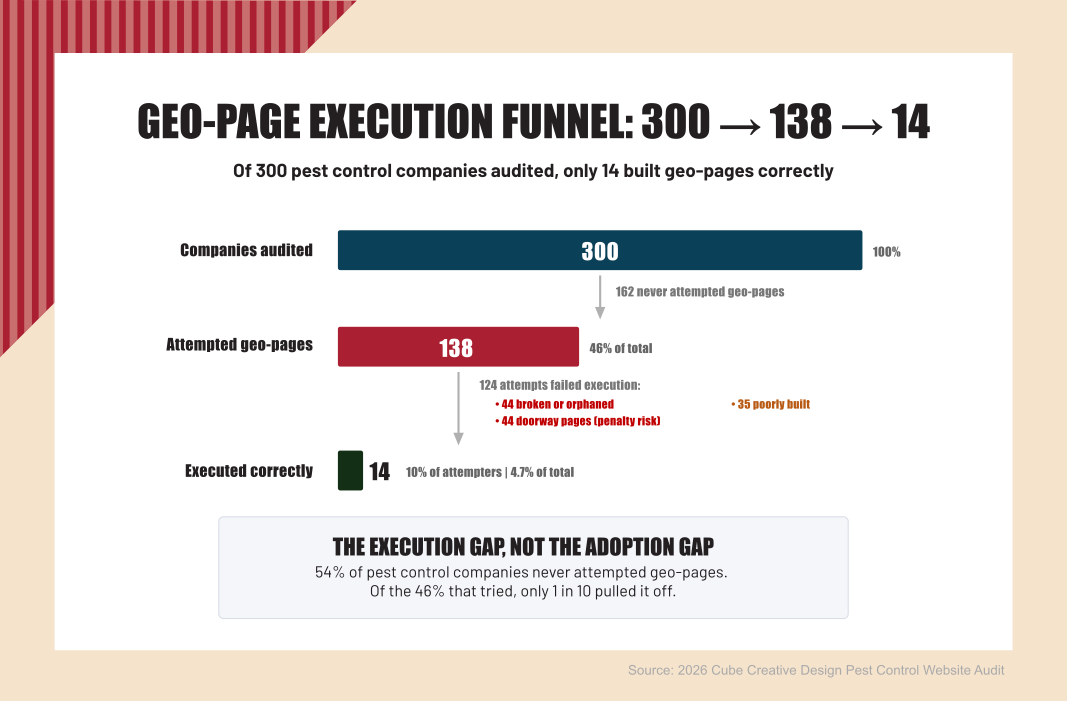
Source: 2026 Cube Creative Design Pest Control Website Audit
The reason this matters is simple. Most owners who try geo-pages do not fail because they did not try. They fail because nobody told them what right looks like. The pillar post on this site explains the diagnostic side. The 2026 Field Audit documents the pattern across the industry. This post is the how-to. By the end, you will know whether your geo-pages are working for you or against you, and you will have a build process you can run today.
Geo-pages are not a tactic in isolation. They are a signal of how the rest of your site is built. Companies without geo-pages were 4 times more likely to have a serious website issue elsewhere on the site, with 37.6 percent of geo-pageless sites carrying at least one severe technical issue compared with 9.3 percent of sites that had geo-pages, according to the same 2026 Field Audit.
What Is a Pest Control Geographic Landing Page (and What Is It Not)?
A pest control geographic landing page is a single page targeting one specific service area, usually a city or county, with content unique to that location. It exists to rank for "[your service] [that location]" searches like "termite control Charlotte" or "mosquito treatment Greenville." Each page should stand on its own with content no other page on your site duplicates.
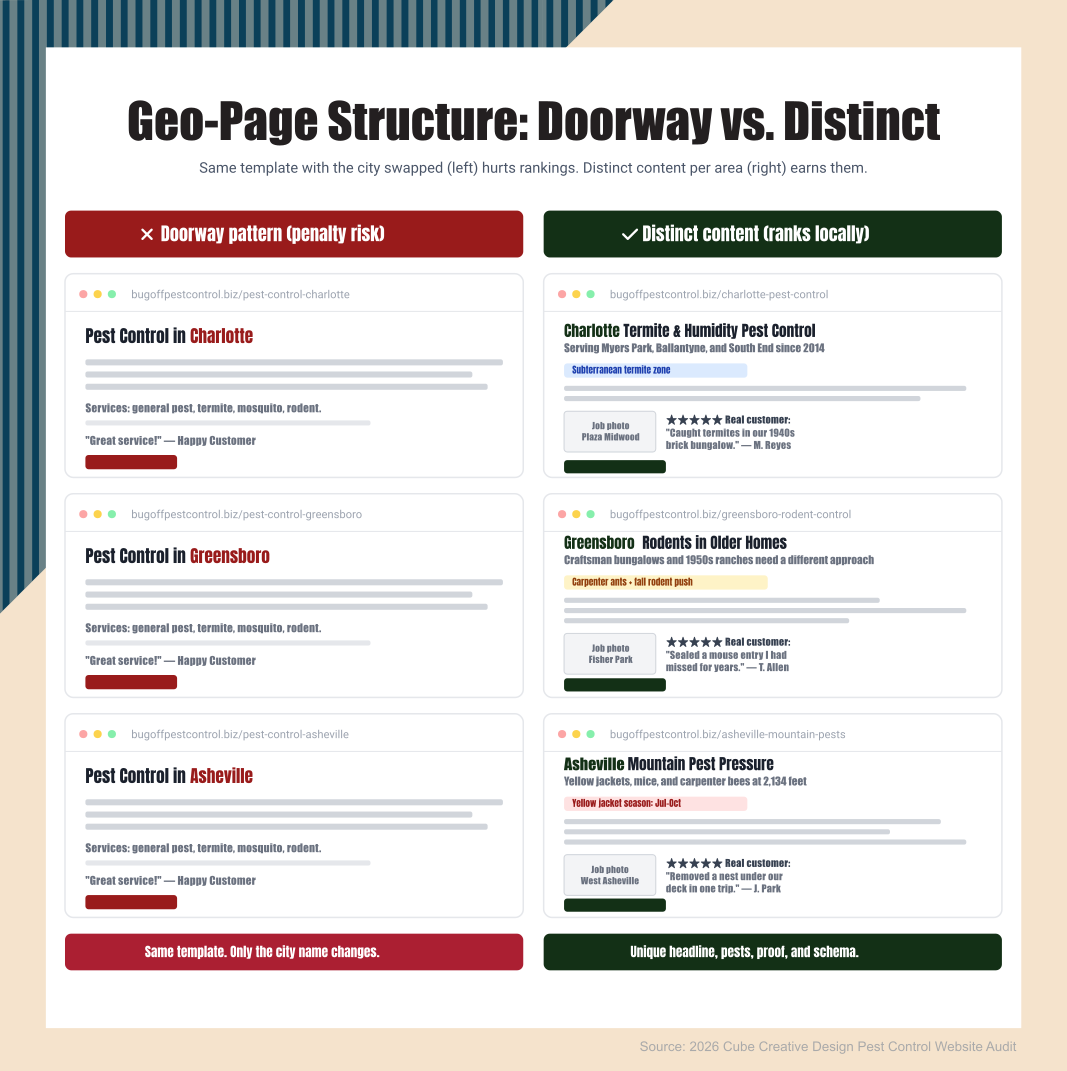
A geo-page is not your homepage with the city name swapped in. If a visitor in Asheville and a visitor in Greensboro see the same content with two different city names, you have a duplicate content problem, not a marketing footprint. Google calls those doorway pages and treats them as spam.
A geo-page is not a thin page with only the city name in the title. "Pest Control in Concord" as a title and three generic paragraphs about pest control underneath is not a geo-page; it is a placeholder. Search engines treat thin location content the same way they treat any other thin content. They ignore it.
A geo-page is not a hidden page no one can reach. If you build twenty city pages and do not link to them from anywhere on your site, Google may not even find them. The 2026 Field Audit found 32 percent of pest control companies with geo-pages had broken or orphaned pages, built once, then abandoned in the sitemap with no real internal navigation pointing at them.
The doorway pages problem is the most dangerous failure mode because the penalty is real. Google's doorway pages policy has been on the books since 2015 and is still enforced in 2026. When a site is found in violation, Google can apply a manual action that suppresses the entire domain, not just the offending pages. One bad batch of geo-pages can sink your whole site.
How Do Pest Control Companies Get Geographic Landing Pages Wrong?
Pest control companies get geographic landing pages wrong in three distinct ways: broken or orphaned pages, doorway pages, and poorly built pages. The 2026 Field Audit found these patterns across the 124 companies that tried geo-pages and missed. A fourth pattern, ZIP-code-targeted pages, shows up inside the poorly-built bucket often enough to call out on its own. They look different from each other, but they share one root cause: building location pages as if Google still ranked by keyword density alone.
Broken or Orphaned Pages (35% of Failures)
These are pages that exist on the server but nobody, including Google, can find them. They are not linked from the main navigation, the footer, or any service page. Sometimes they were built during a previous web design project and forgotten. Sometimes they were built recently but never integrated. Either way, they do not get crawled, they do not get indexed, and they do not bring in visitors. The audit reviewed sites with 18 city pages in the sitemap, and zero of them linked from anywhere a user could click.
Doorway Pages (35% of Failures)
These are duplicate or near-duplicate pages with only the city name swapped in. Same intro paragraph. Same service list. Same testimonials with the city name replaced. The pattern is easy to spot because Google has been spotting it for a decade. The 2026 Field Audit flagged one multi-location operator running essentially the same page across 20+ ZIP codes, with the only difference being the city name and ZIP in the title. That is the textbook definition of a doorway page, and it is the version that puts your whole site at risk.
Poorly Built Pages (28% of Failures)
These are the in-between cases. The page exists. It is linked. It is indexed. But the content is so thin or so generic it could be any city. Title says "Pest Control in Wilmington." Body is three paragraphs that mention Wilmington once and then describe pest control in general terms. Google may rank these for low-competition long-tail searches, but they almost never compete for primary local terms. They are not actively harmful, but they do not earn their place.
Geographic Pages with ZIP Codes in URLs
A Florida operator with 101 reviews had built dozens of geo-pages targeting individual ZIP codes (32907, 32955, 32935, and so on) instead of the cities those ZIP codes belonged to. ZIP code searches are a small fraction of city searches. The pages were technically present but were never going to rank for the terms homeowners actually use. This is a pattern multiple companies in the audit shared.
What Do Correctly Built Pest Control Geographic Landing Pages Look Like?
The 14 companies in the 2026 Field Audit that executed geo-pages correctly shared six common traits. None of them are exotic. None of them require an enterprise content team. They require deliberate work and a willingness to write content that belongs to one place and one place only.
First, one geo-page per primary service area, not one per ZIP code. The companies doing this right picked cities or counties they actually serve and wrote one page per area. If you serve 12 cities, you have 12 geo-pages. If you serve 4, you have 4. Pages-per-ZIP is a quantity strategy, and quantity strategies trigger the doorway penalty.
Second, 800 to 1,500 unique words per page. Each geo-page should have content that lives only on that page. If a paragraph could be moved to a different city's geo-page without anyone noticing, it is the wrong kind of content. The companies executing well wrote about local pest pressure, local neighborhoods, local seasonal patterns, and the specific work they have done in that area.
Third, local proof points. Photos taken in that service area. Customer names from that area with written permission. Local landmarks mentioned naturally where they fit. One company in the audit had a paragraph on each geo-page describing the type of homes most common in that neighborhood and how that shaped the pest treatment approach. That is the level of specificity Google rewards.
Fourth, service emphasis varied by location. Mosquitoes get the headline in Florida coastal pages. Termites get the headline in Southern pages. Bedbug emphasis works in dense urban pages. Match the local pest pressure to the local content. State extension offices publish free pest pressure data by region, and an hour of research per area is enough to write a paragraph that reads as if a local technician wrote it.
Fifth, internal links to nearby geo-pages and relevant service pages. Each geo-page should link to the broader service pages it relates to and to one or two nearby geo-pages where it makes sense. This is the navigation step the broken and orphaned pages miss. A geo-page Google cannot crawl from the rest of the site is a geo-page that does not exist.
Sixth, LocalBusiness schema markup with the location's data, aligned with the Google Business Profile. Each geo-page should carry schema declaring the business, the service area, and the address. Many of the 14 well-built pages had matching configuration in their GBP, with the same address format, the same service area cities, and the same primary category. Geo-pages alone are not enough; the GBP companion piece on this site covers that side of the work.
Want yours audited? It is free, no email capture, and you get a written report on which of these traits your geo-pages hit and which they miss.
How Do You Build a Pest Control Geographic Landing Page?
You build a pest control geographic landing page in seven steps: list your real service areas, research local pest pressure, pull local proof, write a distinct intro, weight services to the area, add internal links, and add schema aligned with your Google Business Profile. The full process is below, and you can run it today.
Step 1. List Your Primary Service Areas
Start with the cities or counties where you actually do work, not where you wish you did work. Pull the last 12 months of customer records and rank service areas by job count. The top 4 to 10 are your initial geo-page list. Do not build pages for areas where you have never run a route. Build for places you can back up with photos, customers, and stories.
Step 2. Research Local Pest Pressure
For each service area, spend 30 to 60 minutes on the state extension office website pulling regional pest pressure data. NC State Extension, Texas A&M Extension, the University of Florida IFAS Extension. Every state has one, and they all publish free regional bulletins. Write one paragraph per area on the pests that dominate, the seasons they peak, and the conditions that drive them.
Step 3. Pull Local Proof
For each area, pull two or three jobs you have done. Get a photo from each, with permission to use it. If you have a customer in the area willing to be named, ask. If not, describe the property type without identifying it. The point is to put something on the page that proves you have actually worked in that location.
Step 4. Write Distinct Intro Paragraphs
Each geo-page gets its own intro. No templates. No copy-paste-swap-name. The intro should reference something specific to that area: a local landmark, a seasonal weather pattern, a property type, the date you first started serving the area. If you write all the intros in one sitting and notice they sound the same, rewrite them.
Step 5. Build Out Unique Service Emphasis
Each page should weight services to the area. A page targeting a humid coastal city emphasizes mosquito and termite work. A page targeting an inland city with older housing stock emphasizes rodent and carpenter ant work. The service list itself can be the same across pages, but the lead service and the case examples should match local pest pressure.
Step 6. Add Internal Links
Each geo-page links to two or three relevant service pages, one or two nearby geo-pages, and back to the homepage in the breadcrumb. This is the structure that fixes the orphan problem. For the service page side of the architecture, the service page structure post walks through the companion build.
Step 7. Add Schema and Align GBP
Add LocalBusiness schema to each page with the address, service area, and primary category. Then open your Google Business Profile and make sure the service area list, primary category, and posted address match the schema on the page. Misalignment between the page and the GBP is a signal Google reads as confusion, and confused signals do not rank.
What If Your Pest Control Geographic Landing Pages Are Already Doorway Pages?
If you already have doorway pages live, do not just delete them. Deleting pages that have any links or any traffic creates a different problem: 404 errors and lost ranking equity. The 2026 Field Audit found several companies that had nuked their doorway pages overnight and then watched their site struggle for months, with some never fully recovering.
Instead, consolidate. Identify the actual service areas you intend to keep. Pick one page per area as the survivor and rewrite that page with the steps in the build process above. 301-redirect every other duplicate to the consolidated survivor. The 301 passes whatever ranking equity the original page had to the new one. Then watch your analytics for the next 8 to 12 weeks to confirm the consolidation is sticking.
Plan for 90 days, not a weekend. A real fix takes time because Google has to recrawl, reindex, and re-evaluate. If a manual action has already been applied to the site, the recovery window after fixes are submitted typically takes several weeks or longer, per Google's own reconsideration guidance. Patience here pays off more than panic does.
Where to Go From Here
Geo-pages alone will not save your site. The 14 companies in the audit doing them right were still only visible in their map pack 57 percent of the time, which means the other 43 percent were doing the work and still losing local visibility. Geo-pages get you eligible. Google Business Profile setup, review velocity, and citation work are what finish the job.
If you want a second set of eyes on your current geo-pages, or you are not sure if what you have is helping or hurting, reach out, and we will figure out where you stand. The audit is free, there is no email capture, and you get a written report you can act on whether you ever hire us or not.
Frequently Asked Questions
How Many Geographic Landing Pages Should a Pest Control Company Have?
Build one geo-page per primary service area you actually work in, not one per ZIP code. For most pest control companies, that means 4 to 12 pages total. The 14 companies in the 2026 Field Audit executing geo-pages correctly averaged 6 to 9 unique geo-pages. More than that, and you are likely heading into doorway-page territory. If you want help mapping your service areas to a clean geo-page set, our local SEO for pest control services team can walk through this with you.
What Is a Doorway Page in Pest Control SEO?
A doorway page is a page built to rank in search for a specific location but offers little or no unique value to the visitor. In pest control, doorway pages usually look like duplicates of a single template with only the city name swapped in: same intro, same service list, same testimonials. Google penalizes doorway pages and can apply a sitewide manual action that suppresses the entire domain when it finds them.
Can I Use ZIP Codes for My Pest Control Geographic Landing Pages?
ZIP codes are a poor choice for geo-page targeting because homeowners almost never search by ZIP. They search by city or neighborhood name. The 2026 Field Audit found multiple companies with dozens of ZIP-code-targeted pages generating effectively zero organic traffic. Use the city or county name instead, and reserve ZIP codes for service-area definitions inside your Google Business Profile and schema markup.
How Long Does It Take to See Results from Pest Control Geo-Pages?
A correctly built geo-page typically takes 8 to 16 weeks to start ranking for its primary local terms, assuming the rest of the site is healthy and internal links point at it. If the site already has indexing issues or a doorway-page history, the timeline can stretch to 6 months or more before recovery shows up. Patience here pays off; rebuilding twice because the first fix was rushed pushes the timeline out further than waiting did.
Do I Need Schema Markup on Every Pest Control Geographic Landing Page?
Yes. Every geo-page should carry LocalBusiness schema with the address, service area, and primary category fields filled out. Schema is not a ranking factor by itself, but it gives Google a clean machine-readable description of the business and the area you serve. Pages without schema still rank, but they leave a signal on the table and lose the alignment between the page and your Google Business Profile that Google uses to confirm location authority.