You spent real money on your pest control website. The homepage looks sharp, your phone number sits in the header, and your services are listed in the menu. But the service pages themselves often do nothing. They don't bring in calls, they don't show up when someone searches "termite treatment near me," and they sit there like a service truck stuck in the shop with a busted alternator. After auditing 300 websites built for pest control companies in 2026, the same pattern keeps showing up: service pages that look fine to a visitor but read like wallpaper to Google.
The Thin Service Page Problem
Walk through almost any pest control website, and you'll find it. The "Termite Treatment" page is one paragraph. The body text could describe ant control with five words swapped in. There's no information about how the treatment works, what to expect, or what it costs. The page doesn't link to anything else on the site. The meta description is auto-generated from the first sentence, which itself is a thinly disguised version of the homepage opener.
That's a thin service page. It's the digital equivalent of a one-line yellow pages ad in a search-driven world.
The pattern shows up in several specific ways. Five different service pages will share the same boilerplate paragraphs with the pest name swapped in. A page meant to rank for "mosquito control" describes the company instead of the pest or the treatment. The page has no internal links pointing to related services, no pricing context, no schema markup. The biggest tell: the body could be lifted off the page entirely and the rest of the site wouldn't notice it was gone.
Across our 2026 audit of 300 pest control websites, 65 percent had at least one high-priority issue on their sites. A big share of those issues live on service pages. This isn't a website design problem. It's a content architecture problem. And the cost is real: if your termite page can't rank, a competitor's can. Homeowners with a real pest problem are going to find someone, and the only question is whether that someone is you.
Service Pages vs. Geo-Pages
Service pages and geo-pages get confused all the time. They are not the same thing, and lumping them together usually weakens both.
A geo-page targets a location-based search like "pest control in Hickory" or "exterminator Charlotte." Its job is to rank for a city or neighborhood. A service page targets a service or pest type search: "termite treatment," "bed bug removal," "mosquito control programs." Its job is to rank for the type of work, not the place.
A complete website has both, and they're linked together. The service page explains what you do. The geo-page explains where you do it. A homeowner in Asheville searching "carpenter ant treatment Asheville" might land on either one, depending on Google's read of the intent. A well-built site has answers for both.
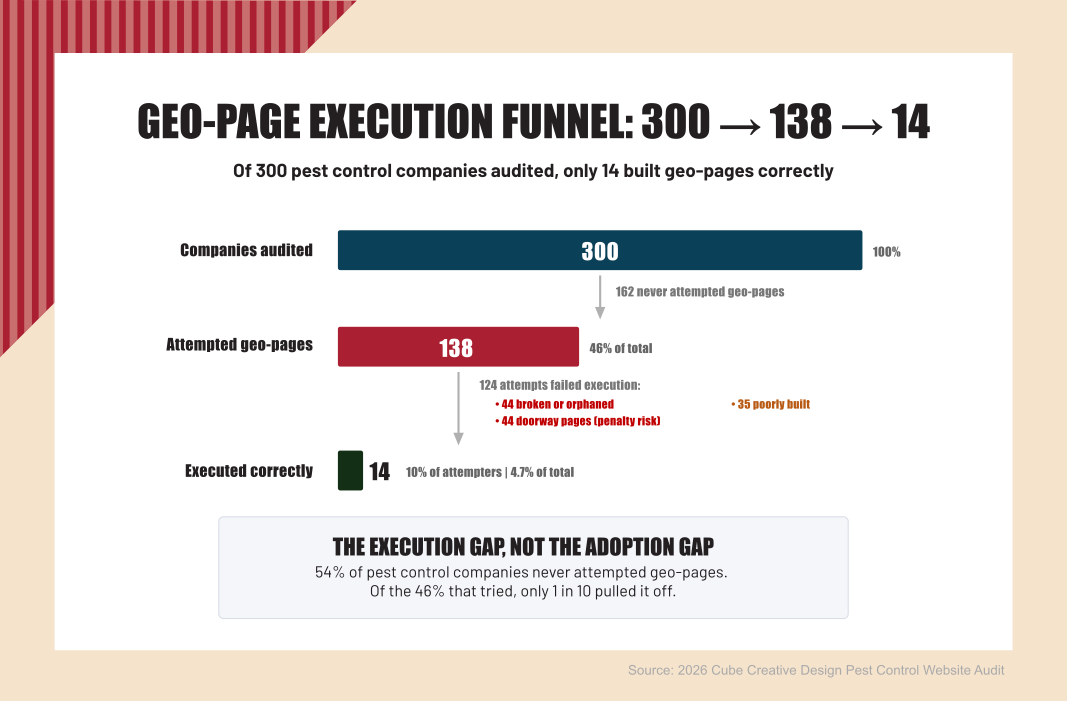
Source: 2026 Cube Creative Design Pest Control Website Audit.
The mistake I see most often is combining the two into a single "Termite Treatment in Charlotte" page, then repeating that same template for every service in every city. That occasionally works at the city level for a single anchor service, but more often it dilutes both intents and produces a flock of pages that compete with each other. Keep them separate. Service pages do service work. Geo-pages do location work.
What the Audit Found
When you look at enough pest control websites in a row, the same problems keep showing up. The list below comes from patterns observed across companies I've audited. None of these are unusual. They're the rule, not the exception.
- Companies with five or more service pages where the body content is nearly identical. Change the pest name, change the headline, leave everything else the same. Google sees one piece of content, not five.
- Service pages with no internal links to related services. No "if you have termites, you may also have…" structure. Each page sits alone.
- Service pages with no pricing context. No ranges, no variables, no honest "it depends on…" section. This is one of the biggest missed opportunities for price-related searches.
- Service pages that don't actually answer the searcher's question. Someone typing "how does termite treatment work" lands on a page that opens with "Our team of experienced professionals…" and bounces in eight seconds.
- Service pages with no schema markup. Nothing telling search engines this is a service offering, what it costs, where it's offered, or what it covers.
- Service pages with no meta description at all. The CMS auto-generates one from the first line of body copy, which usually starts with the company name and adds nothing useful.
A few specific examples from the audit work, anonymized: one operator had a liquid termite page and a baiting termite page with so much shared content that consolidating them into one was the only honest recommendation. Another operator had service pages with no internal linking anywhere. True cul-de-sac pages a visitor could enter but never leave. Several operators were missing meta descriptions across most of their service pages. None of these problems are exotic. They're just unaddressed.
The Service Page Architecture That Ranks
A page that ranks isn't a long page. It's a structured page. Each section does a specific job. Skip a section, and you lose a ranking signal. Add fluff, and you bury the signal you wanted.
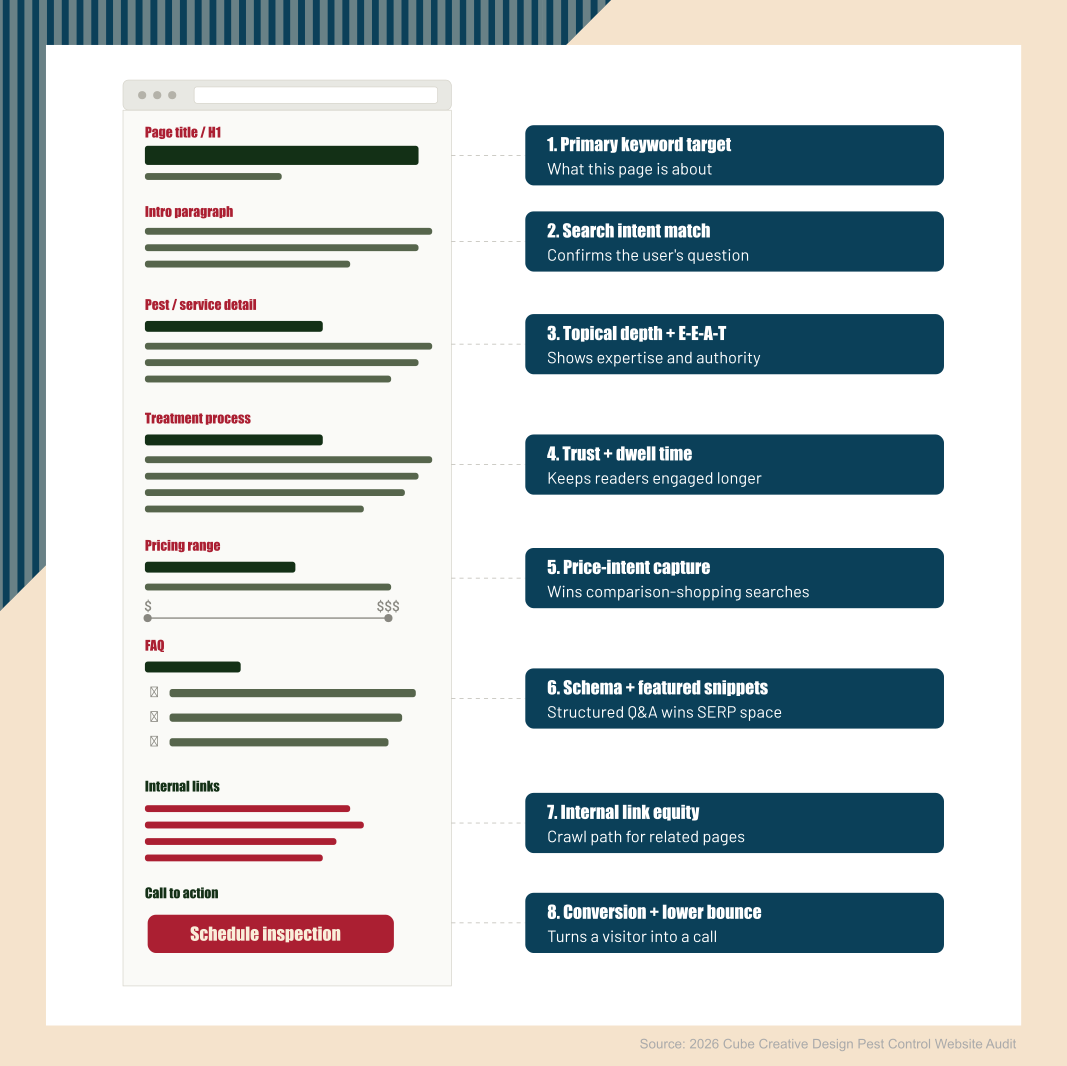
Source: 2026 Cube Creative Design Pest Control Website Audit.
The Title and H1
Be specific. "Termite Treatment Services" beats "Our Services." "Subterranean Termite Treatment" beats "Termite Treatment Services" if that's the actual pest you do best. The title tag and the H1 should match, or the H1 should be more specific than the title. Never use vague labels like "What We Do" or "Service Offerings" on a page meant to rank.
The Intro Paragraph
Open with the customer's problem in plain language. Not "Our team of expert technicians has been serving the area since 1987." More like: "If you've found mud tubes along your foundation, you probably have a subterranean termite problem." The first paragraph should signal to the searcher and to Google that this page is about their problem, not your company.
The Pest or Service Section
Two or three paragraphs explaining what this pest is, where it lives, how to identify it, and why it matters. Damage, health risks, frequency in your service area. If the page is about a service rather than a pest (like "Quarterly Pest Maintenance"), this section explains what the service covers and who it's for.
The Treatment Process
Two or three paragraphs walking through what actually happens. Inspection, treatment, follow-up. What the customer experiences, what your tech does, what the homeowner needs to do before and after. This section is what separates a real service page from a brochure paragraph. It's also where you build trust.
The Pricing Section
Ranges, not exact prices. Variables that affect cost: square footage, severity of infestation, structure type, recurring vs. one-time service. This section is the single biggest ranking lever for price-intent queries, and most pest control sites skip it entirely. Owners worry about being undercut. The honest answer is that the customers comparing prices will compare them regardless. Better to be in the conversation than excluded from it.
The FAQ Section
Three to five real questions homeowners ask, not throwaways. "How long does termite treatment take?" "Do I need to leave the house during treatment?" "Is the treatment safe for pets?" Each one with a direct answer. Use proper FAQ markup so search engines can read it as a structured unit and serve it in featured snippets. This is also where service-specific schema can be added.
The Internal Linking Pattern
Every service page needs four to six internal links at minimum: two or three to related service pages, one or two to geo-pages where this service is offered, one back to the services hub or homepage, and one to a relevant blog post if you have one. Without this, the page is a digital dead end.
The Call to Action
Add one primary CTA ("Schedule an inspection") and one secondary CTA ("Call us") with the local phone number visible. Both should be reachable without scrolling on mobile. The primary CTA is the page's job. Everything above it is setup. If the button is buried, the page works against itself.
Supporting Elements: Schema and Meta Description
Two more pieces don't get their own block in the wireframe but still need to be on every service page before it goes live.
Add Service schema appropriate to the offering. Don't fake aggregate review counts you don't actually have. Service schema tells search engines what the page is, who it's for, and where it's offered. Validate it before publishing.
Write a real meta description by hand. 150 to 160 characters, primary keyword included, with a benefit at the end. Auto-generated meta descriptions almost always lead with the company name and waste the space. The meta description is your one chance to earn a click from the search results page. Treat it like a small ad.
The Internal Linking Trap
The audit data keeps turning up a pattern I call "no cul-de-sacs." Service pages where a visitor could land but couldn't go anywhere from. No related services. No location pages. No blog content. The visitor either calls or leaves, and most of them leave.
This is bad for users, and it's bad for rankings. Google's own internal linking documentation is clear that internal links help search engines find, crawl, and understand the relationships between your pages. A service page with no internal links reads as low-priority to a search crawler, even when the content is genuinely good.
A working service page links three directions:
- Up: to the services hub or homepage, so a visitor and a crawler can move back up the site.
- Sideways: to related service pages and at least one geo-page where this service is offered.
- Down: to a relevant blog post if one exists. Blog posts go deeper than a service page can.
Without those exits, even a well-written service page leaks ranking equity. Fix the cul-de-sac problem on a service page, and you'll often see ranking improvements within weeks, with no other change to the page itself.
The Service Page Launch Checklist
Before you publish or republish a service page, run through this list. Most of these are five-minute fixes. Together they make the difference between a page that ranks and a page that doesn't.
- Page title and H1 are specific to the pest or service. They match, or the H1 is more specific than the title.
- Meta description is written by hand. Between 150 and 160 characters. Includes the primary keyword.
- Pricing range is present. Even a wide one with variables explained.
- FAQ section has at least three real customer questions, each with a direct answer.
- Internal links: minimum four. At least one to a related service, at least one to a geo-page, at least one to the services hub or homepage.
- Schema markup is added and validated. Use Google's Rich Results Test to confirm it reads correctly.
- Every image has descriptive alt text. Not "image1.jpg." Not "termite." More like "subterranean termite mud tubes along home foundation."
- Mobile readability is confirmed. Open the page on your phone and read it. If you have to pinch or scroll sideways, fix it.
Conclusion: Where to Start Fixing Pest Control Service Pages
Service pages and geo-pages do different jobs, and a complete site needs both pulling their weight. If your service pages are tight but the calls still aren't coming in from your service area, that's a separate problem on the geo-page side. The descriptions on your service pages should also match the service list on your Google Business Profile. If those don't line up, you're confusing Google and the homeowner at the same time. If you want a second set of eyes on your current pest control service pages, reach out, and I'll take a look. No pressure, no pitch, just honest feedback on what's working and what's costing you calls.
Frequently Asked Questions
How Many Service Pages Should a Pest Control Website Have?
Build one service page for each distinct service or pest type you actively want to rank for. A typical pest control company ends up with eight to fifteen pages: termite, mosquito, rodent, bed bug, ant, roach, wildlife, commercial, and recurring maintenance, plus any local specialties. Each page needs to be substantial and unique. If you can't write 600 to 800 words of genuinely different content for a service, it doesn't deserve its own page.
Do Pricing Ranges on Service Pages Actually Help Rankings?
Yes, especially for price-intent searches like "how much does termite treatment cost." Google rewards pages that answer the searcher's question directly. A service page with no pricing context will lose to a competitor that includes ranges, even when your service is better. Use ranges with variables (square footage, severity, structure type) rather than exact prices, and you'll capture price-related search traffic without locking yourself into specific quotes.
What's the Difference Between a Service Page and a Blog Post?
A service page sells a specific service and is structured to convert a visitor into a call. A blog post answers a question or educates the reader. Service pages live in the main navigation and stay mostly static. Blog posts live in a content section and accumulate over time. Both should link to each other, but they serve different jobs and should be written differently. A common mistake is using a service page to publish what's really a blog post, or vice versa.
How Often Should Service Pages Be Updated?
Review every service page at least once a year. Update pricing ranges, refresh the FAQ, add new customer questions you've started hearing, and check that all internal links still go where they should. If a search ranking drops noticeably on a service page, look at the current top-ranked pages for that query and see what's different. Most service pages don't need full rewrites, just steady tune-ups.
Should Service Pages Mention the Brand of Products or Equipment Used?
Sometimes, but sparingly. Mentioning a product brand only helps if customers are actively searching for it. For most pest control services, the homeowner cares about results, not which manufacturer made the bait station. Where brand names do help: termite treatments where a customer might recognize a product (Termidor, Sentricon) or commercial accounts where specific protocols matter. Don't write a service page that reads like a product brochure.