
Not sure which source your conversions are coming from?
Google Analytics can help you solve that dilemma.
In Google Analytics 4 (GA4), data is collected and categorized to help marketers assess how users arrive at a site, which performance metrics are strongest, and where adjustments might be needed.
This comparison of organic and paid methods can help teams prioritize tasks, allocate marketing budgets wisely, and understand how each channel contributes to company objectives.
SEO typically involves strategies like publishing keyword-focused content, optimizing website performance, and building a strong backlink profile.
Paid traffic often involves managing campaigns in Google Ads or similar advertising networks.
Let’s dive into how to analyze SEO vs paid traffic in Google Analytics 4.
GA4 Basics for Channel Tracking
Google Analytics 4 classifies incoming visits into categories known as channels, such as Organic Search, Paid Search, Referral, and Direct.
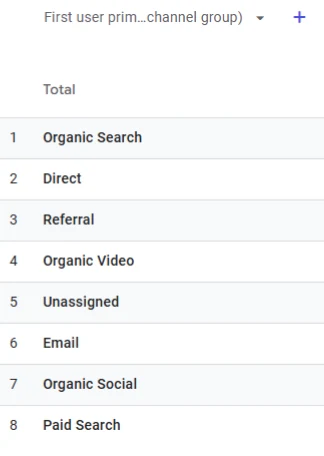
This system helps you see which method brought a visitor to your site.
GA4 has a different data model compared to its predecessor, meaning that events and users are measured in a way that focuses more on user engagement rather than just pageviews or sessions.
Default Channel Groupings in GA4
GA4 automatically assigns most traffic to channels based on how the visit was triggered.
For instance, when Google detects visits coming from a search engine without paid parameters, it usually falls under Organic Search.
If there are specific ad parameters that match recognized naming patterns (like utm_medium or gclid for Google Ads), GA4 categorizes that traffic under Paid channels.
Built-in rules guide this classification process, so a good practice is to confirm that your URLs have correct tagging.
Misconfigured or missing parameters can lead to inaccurate reporting and confusion in identifying the real source of a visit.
UTM Parameters
Adding UTM parameters to links helps GA4 track paid campaigns accurately.
UTM parameters are additional bits of text appended to a URL, such as utm_source, utm_medium, utm_campaign, and the rest.
When someone clicks a link with these codes, GA4 records them and categorizes the session accordingly.
This method allows you to differentiate campaigns, ad variations, or even different sources within the same ad platform.
Key Benefits of GA4’s Approach
- More Detailed User Insights: GA4 captures actions (events) rather than just counting visits. This means better awareness of what happens on a page, whether that is a button click, video view, or form submission.
- Improved Cross-Platform Measurement: GA4 lets you track user interactions across websites and apps with a unified structure, so you have a better idea of how people move across different platforms.
- Predictive Metrics (if applicable): GA4 may offer predictive analytics for sites with enough data, allowing you to measure probabilities of user actions such as churn or purchase, which can help with both organic and paid channel decisions.
Setting up GA4 with accurate channel tracking is the first step to comparing SEO and paid traffic.
Detailed tagging and a clear naming structure for campaigns help you see which efforts contribute the most to user engagement, lead generation, or revenue.
By aligning your GA4 configuration with marketing goals, you can later review your SEO and paid traffic data and make decisions supported by actual performance data.
Tracking SEO Performance in GA4
Tracking organic performance in Google Analytics 4 starts with recognizing how visits are labeled and where they originate.
Traffic that arrives through search engines without paid parameters is typically grouped under Organic Search.
GA4 includes several SEO reports and features that help you assess the value of this channel and decide how to improve content.
Organic Search Metrics
One of the most important indicators is the number of users who arrive through organic keywords.
This can be found in standard reports or custom explorations that focus on Organic Search as the medium.
Engagement metrics, such as engaged sessions and average engagement time, show whether visitors find your content valuable.
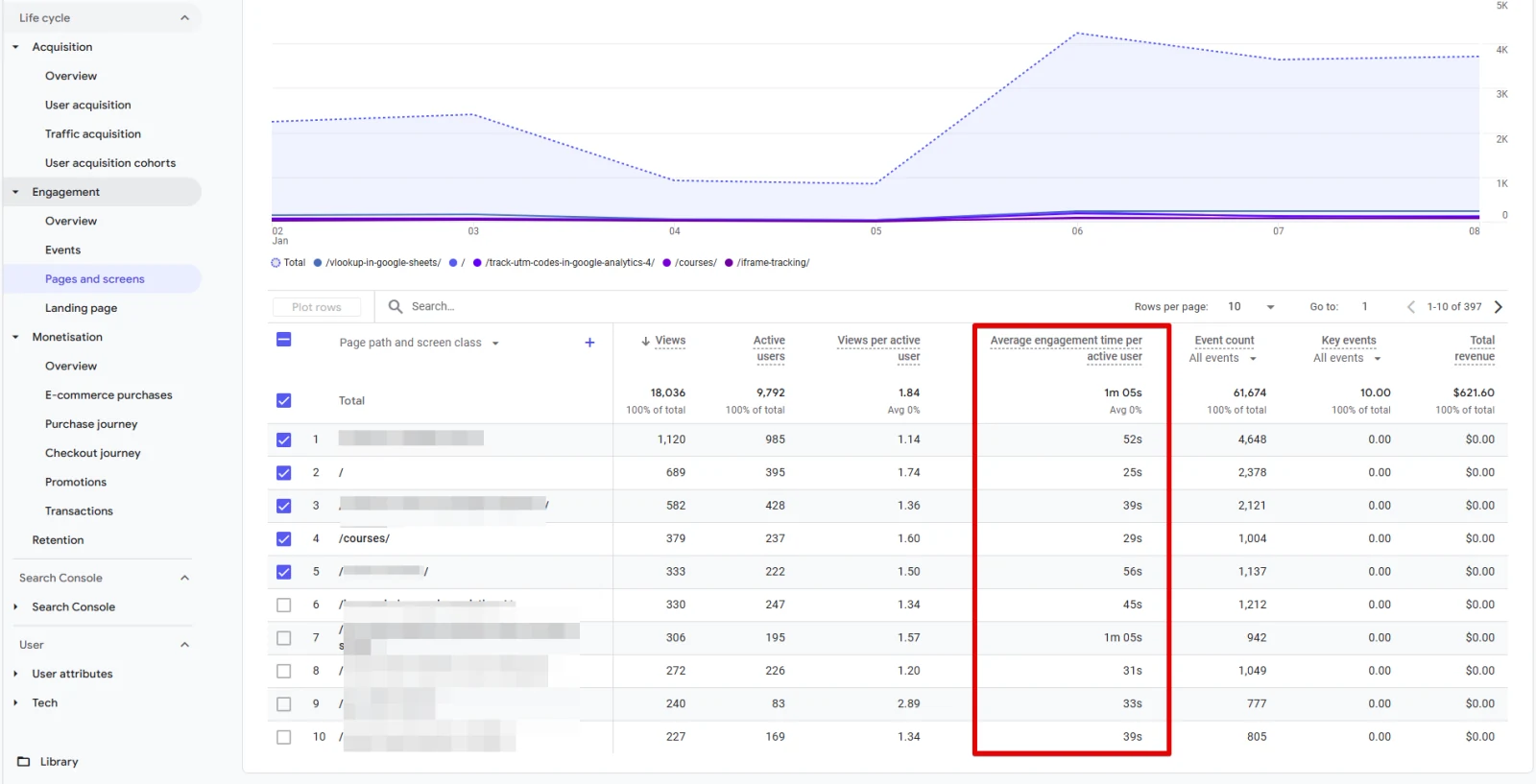
Conversions tied to organic traffic reveal how well your pages support business goals, whether that involves purchases, sign-ups, or other key actions.
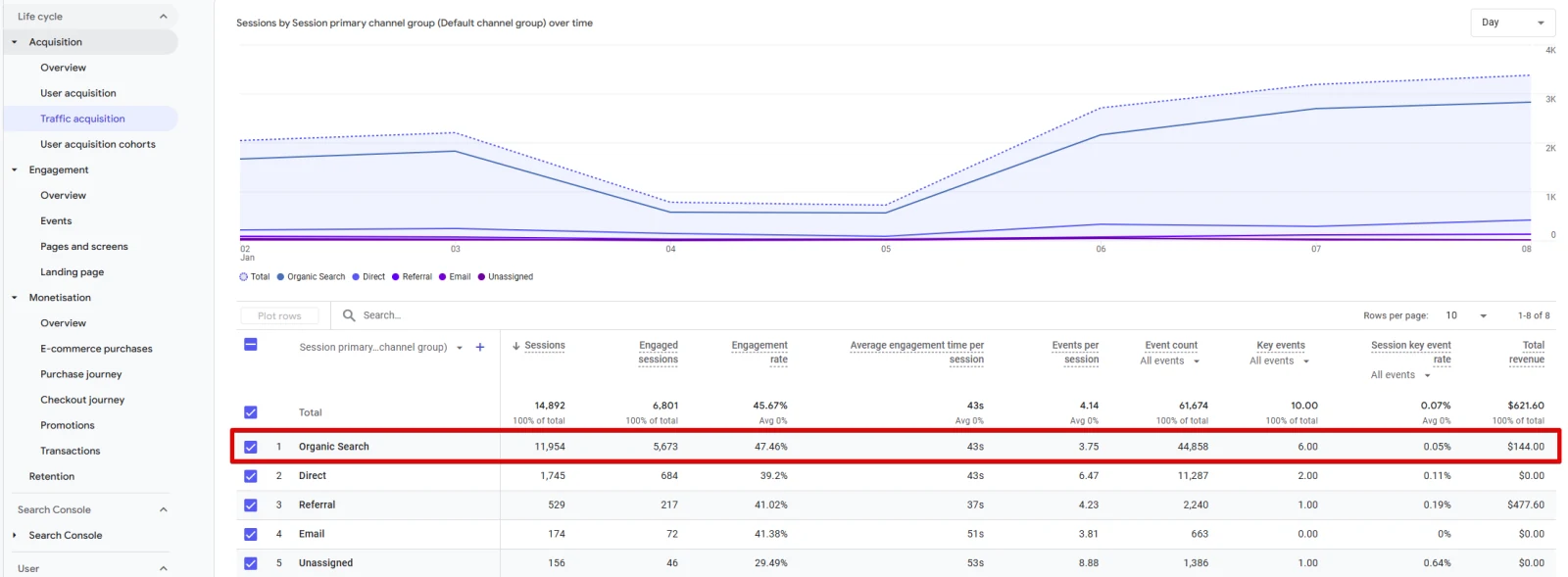
Examining Content Performance
Within GA4, marketers can use the Pages and Screens report or create a custom exploration to see which pages receive the most organic traffic.
This helps identify high-performing pages, topics, and user pathways.
Comparing bounce rates or exit rates between pages can point out areas where users lose interest.
In GA4, the bounce rate is replaced by the concept of “engaged sessions” so data might look different from previous versions of Analytics.
The key is to focus on how often users interact with the page, rather than just how many times it loads.
Linking GA4 with Google Search Console
Connecting Google Search Console to GA4 provides deeper insight into how often your site appears in search results, which queries drive the most clicks, and how those visitors engage once they arrive.
This link extends your view beyond what happens on the site itself, giving more context for keyword strategies and technical adjustments.
The data from the Search Console can also reveal impressions, click-through rates, and average positions in search results, which can guide further optimization steps.
Actionable Tips
- Focus on content that aligns with user intent. GA4 metrics will show which pages successfully match searchers’ needs.
- Review mobile user data to confirm that site performance is strong on phones and tablets. Mobile-friendly pages often rank better in search results.
- Keep track of organic conversions. If a page has high traffic but low conversions, test different elements such as calls to action, headlines, or page layout.
Tracking Paid Traffic Performance in GA4
Paid campaigns require accurate labeling of inbound links, which allows GA4 to record each session as coming from a specific ad.
This is often done with UTM tags or auto-tagging when connected to Google Ads.
Getting these parameters right ensures that each click is attributed to the correct campaign, medium, and source.
Key Paid Metrics
Marketers frequently look at cost data, clicks, conversions, and Return on Ad Spend (ROAS) when reviewing paid performance.
GA4 presents data in an event-focused manner, so you can see which user actions follow an ad click.
Conversions triggered by paid traffic provide clear insights into whether the campaign pays off.
In e-commerce contexts, revenue from paid channels is a strong indicator of how ads contribute to overall sales.
Reviewing Campaigns in GA4
GA4’s Acquisition reports help you see which campaigns bring in users who engage meaningfully.
If you want to refine your analysis, you can build custom explorations that separate paid traffic by source, campaign name, or ad content.
You can also track user engagement over time to see if paid clicks return for additional sessions.
Repeated visits might suggest that certain ads drive long-term user interest.
Let’s dive into a few reports which can show insightful information about your paid search traffic.
To open the traffic acquisition report follow these steps:
- In GA4, select Reports from the left-hand menu.
- Click Acquisition and then choose Traffic Acquisition.
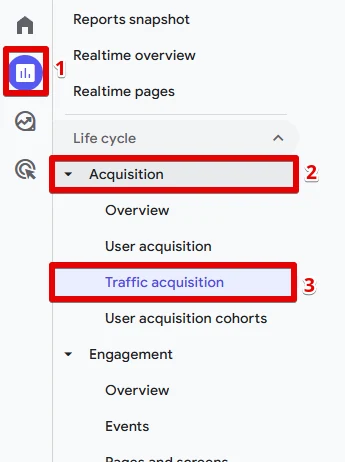
The default view shows various channels, including Organic Search and Paid Search.
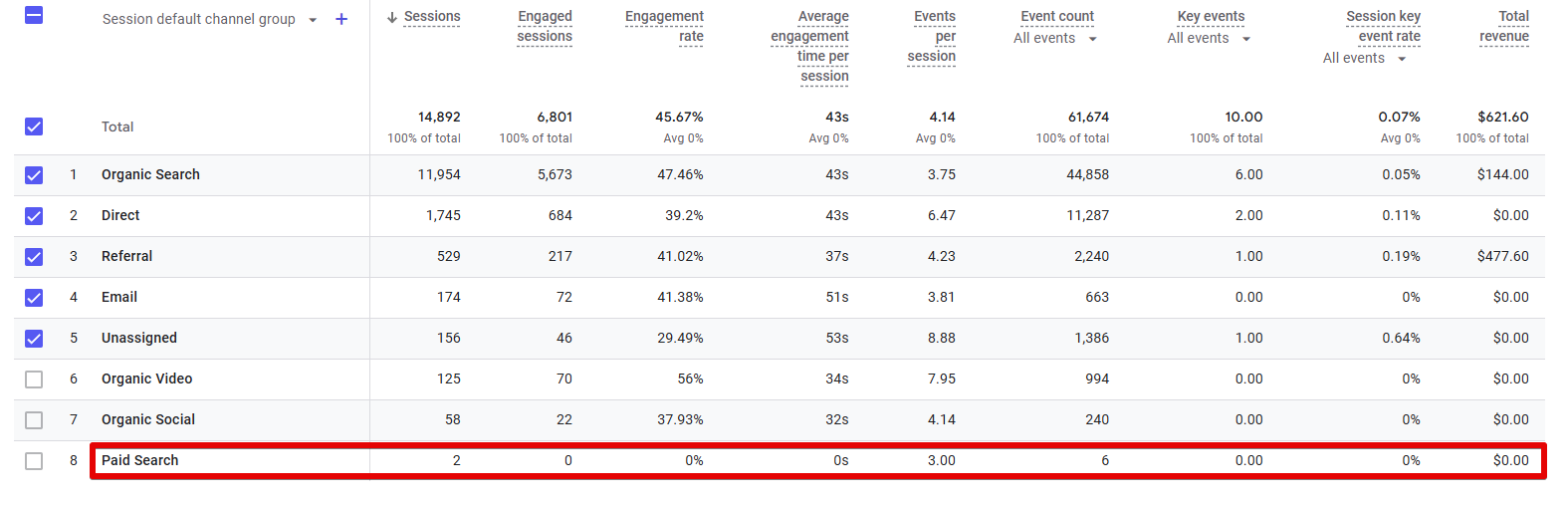
You can always dissect this report further to get more specific information.
Engagement reports can also be useful.
The landing page report lists the top landing pages and how users interact with them once they arrive.
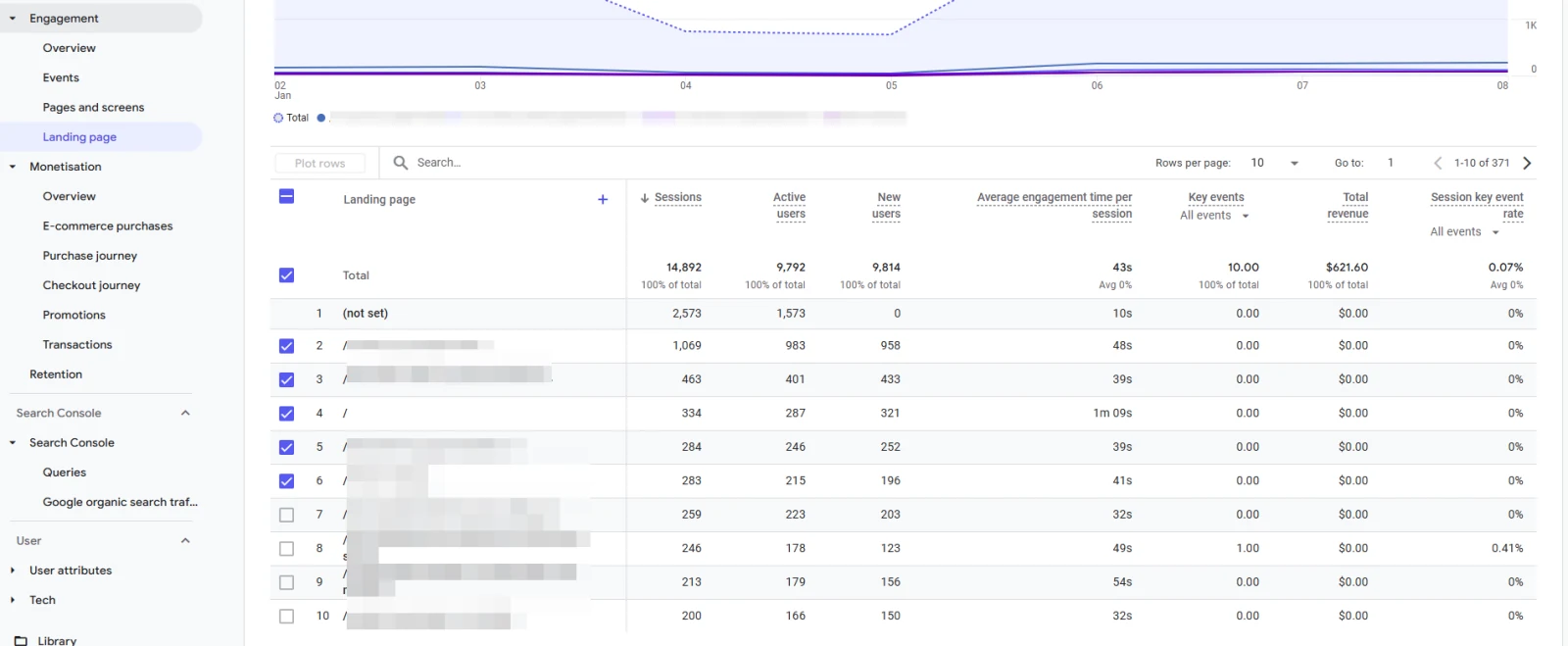
For paid search campaigns, landing page performance is crucial. Tracking engaged sessions and conversions per landing page indicates whether your ads direct users to content that meets their expectations.
The events report records specific user interactions like button clicks, form completions, and video plays.
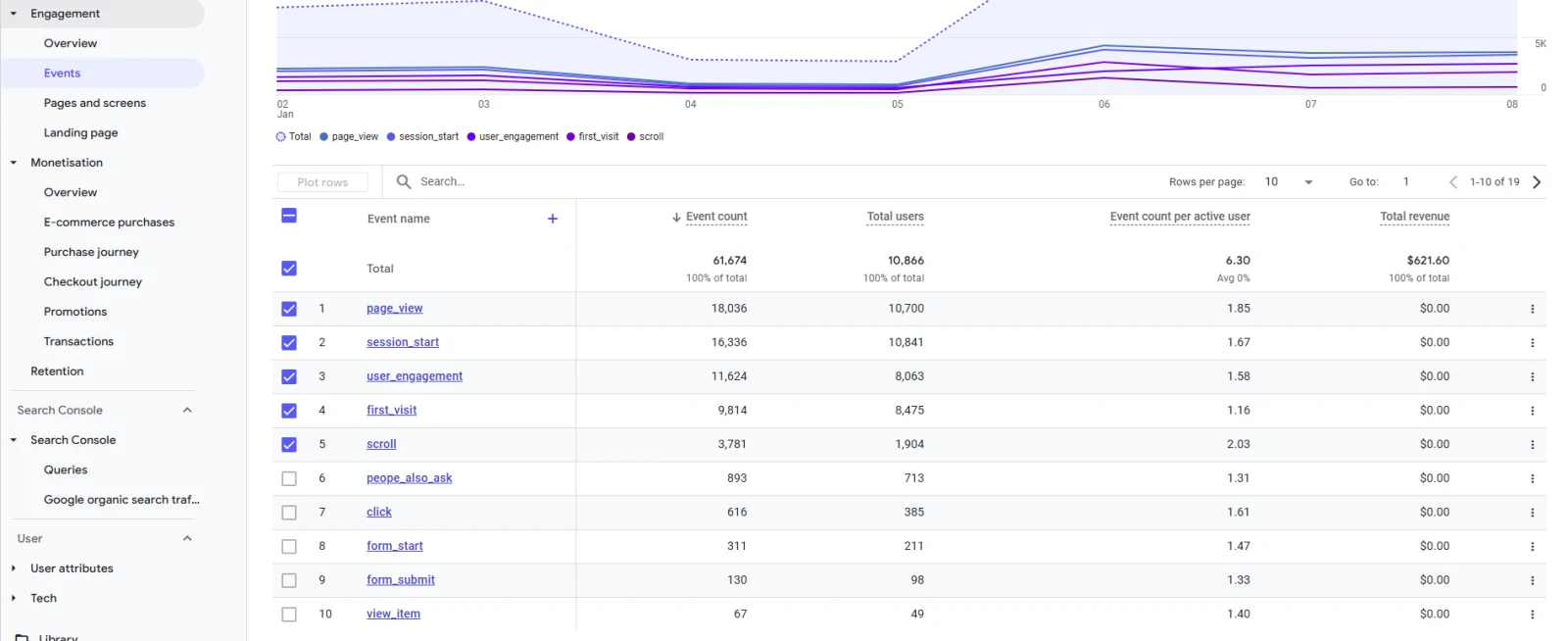
Paid traffic might target certain actions (e.g., “Request a Quote” button clicks). If you’ve set up events for these actions, this report clarifies whether paid search visitors are performing them.
You can set up custom events and find them here and in exploration reports (also a good place to find more insights about your paid traffic).
Connecting Google Ads and GA4
By linking a Google Ads account to GA4, you can import analytics data into Google Ads, allowing you to build remarketing lists or measure conversions directly.
This connection helps you measure ad performance more accurately because it syncs events from GA4 with the ad platform.
Bid strategies can be shaped by accurate conversion data, and you can observe campaign performance in both GA4 and the Google Ads interface.
Actionable Tips
- Label campaigns with clear UTM parameters so you can segment by source, campaign, and ad content.
- Monitor engaged sessions, conversions, and revenue generated by each campaign to see which ads justify their costs.
- Test ad copy, landing page designs, and audience targeting. Changes that lead to more engaged sessions can have a positive impact on quality scores and future ad costs.
Comparing SEO vs Paid Traffic in Google Analytics 4
GA4 supplies the tools to measure performance for both organic and paid channels in one place.
By looking at standard and custom reports, you can identify which channel drives more engagements, conversions, or revenue.
This comparison is important because each channel has distinct costs, time frames for results, and potential benefits.
Cost Factors
Paid campaigns require a budget to drive immediate clicks, while organic traffic does not incur direct costs per visit.
However, SEO often involves content creation, link-building efforts, and technical work.
Reviewing how much is spent on each channel in comparison to the revenue or conversions generated provides a clearer picture of return on investment.
Performance Indicators
Look at conversions, user engagement metrics, and potentially the lifetime value of users from each channel.
Some businesses see high purchase intent from paid traffic, while organic users may show steady interest over time.
GA4’s event tracking and custom reports simplify the task of comparing these behaviors side by side.
When to Focus on Each Channel
Businesses in competitive industries might prefer paid ads for quick results.
Others with established authority might rely more on organic growth, which can be more cost-effective over time.
Reviewing GA4 data on how each channel contributes to conversions will guide your decision on channel investments.
In some cases, a balanced approach provides the strongest outcome, with paid ads driving immediate visibility while organic pages build authority for long-term stability.
Tips for Optimizing Both Channels in GA4
Achieving better outcomes from both organic and paid efforts in Google Analytics 4 often involves applying proven methods that encourage consistent results.
Below are some suggestions to help bring together your SEO and paid traffic strategies in one measurement platform.
Coordinate Tagging and Tracking
- Use Consistent Naming Conventions: Assign clear labels to campaigns, ad groups, and sources. This approach keeps data organized so you can spot patterns without confusion.
- Validate UTM Parameters: Double-check that all links, especially those in paid campaigns, include correct UTM parameters. Misspelled or missing tags can lead to gaps in reporting.
- Combine Your Data Sources: Link GA4 with tools like Google Ads and Google Search Console. This allows both channels to share metrics without switching between multiple dashboards.
Refine Attribution Settings
- Study Conversion Paths: GA4’s path analysis lets you see how users move from initial contact to final conversion. This helps identify whether organic pages or paid ads typically lead to a conversion.
- Compare Data-Driven Attribution vs. Last Click: Test different attribution models to find one that best fits your business goals. Data-driven models can show how each channel contributes to user actions in a more balanced way.
Adjust Campaigns and Content Regularly
- Test Multiple Ad Variations: Rotate ad copy and landing pages, then monitor engaged sessions and conversion rates. Frequent changes can highlight winning approaches.
- Refresh Organic Content: Update top-performing pages to keep them relevant for search queries. GA4 metrics help confirm if these updates lead to higher user engagement.
- Target Specific User Segments: Group visitors by actions or demographics, then design ads or SEO content that address each segment’s interests.
Use A/B Testing and Experiments
- Create Simple Tests: Compare one version of an ad or page against another, then observe results in GA4. Stick to small changes that directly impact conversions, such as headlines or calls to action.
- Monitor Engagement Metrics: Look beyond raw conversion numbers to check if changes also affect session duration or engaged sessions. A winning variation should deliver improvements on multiple levels.
Review Long-Term Results
- Watch Trends Over Weeks or Months: Paid campaigns can cause quick traffic spikes, while organic efforts may grow at a slower pace. Tracking both over time indicates whether one is consistently outperforming the other.
- Document Key Observations: Keep simple records of changes to SEO tactics or ad strategies. Referring to these notes later can explain shifts in data.
Implementing these methods in GA4 strengthens your ability to understand what motivates users to take action.
By tracking consistent data across both organic and paid channels, you can make more informed decisions about budget allocation, keyword focus, and overall marketing strategy.
Conclusion
Reviewing both SEO and paid data in Google Analytics 4 reveals which channels are most effective at drawing attention, generating conversions, and driving revenue.
The event-based measurement approach in GA4, combined with robust reporting and segmentation options, allows you to compare the performance of organic pages and paid ads more accurately than earlier Analytics versions.
By setting up clear UTM parameters, linking GA4 with Google Ads and Google Search Console, and checking key metrics regularly, you can pinpoint how each channel affects the user journey.
Whether you rely on paid ads for quicker visibility or prefer to focus on search engine optimization, GA4 supplies the facts needed to refine strategies and justify marketing spend.
The goal is to approach each channel with a clear plan, track outcomes, and then adjust based on real-time data.
In doing so, businesses can direct resources where they create the strongest results and maintain growth in both the short term and the long term.
If you’ve liked this post, be sure to check out our guide to skyrocketing your conversions with Google Analytics 4.