Personalized video for schools means recording one short master video once and letting a template adapt it for each family with a name, grade, and program. For a private school sending 1,000 inquiry follow-ups or re-enrollment reminders, a self-run render pipeline can keep the render cost per video low, though it takes a one-time build effort. Hosted API prices vary widely, and sensitive news still deserves a hand-recorded message.
Picture your admissions office in the middle of admissions season. The same inquiry follow-up, campus tour reminder, and deadline nudge go out to hundreds of families. Often one or two people write them, and those same people also run open houses and answer the phone. Parents compare several schools at once, so their inboxes fill with messages that read almost word for word alike.
Why do plain follow-up emails get ignored?
Plain follow-up emails often look like every other school’s message, so busy families may skim them. A short personalized video that greets the family by name and mentions their child’s grade or program may help a follow-up stand out. A template makes that possible without recording each video by hand.
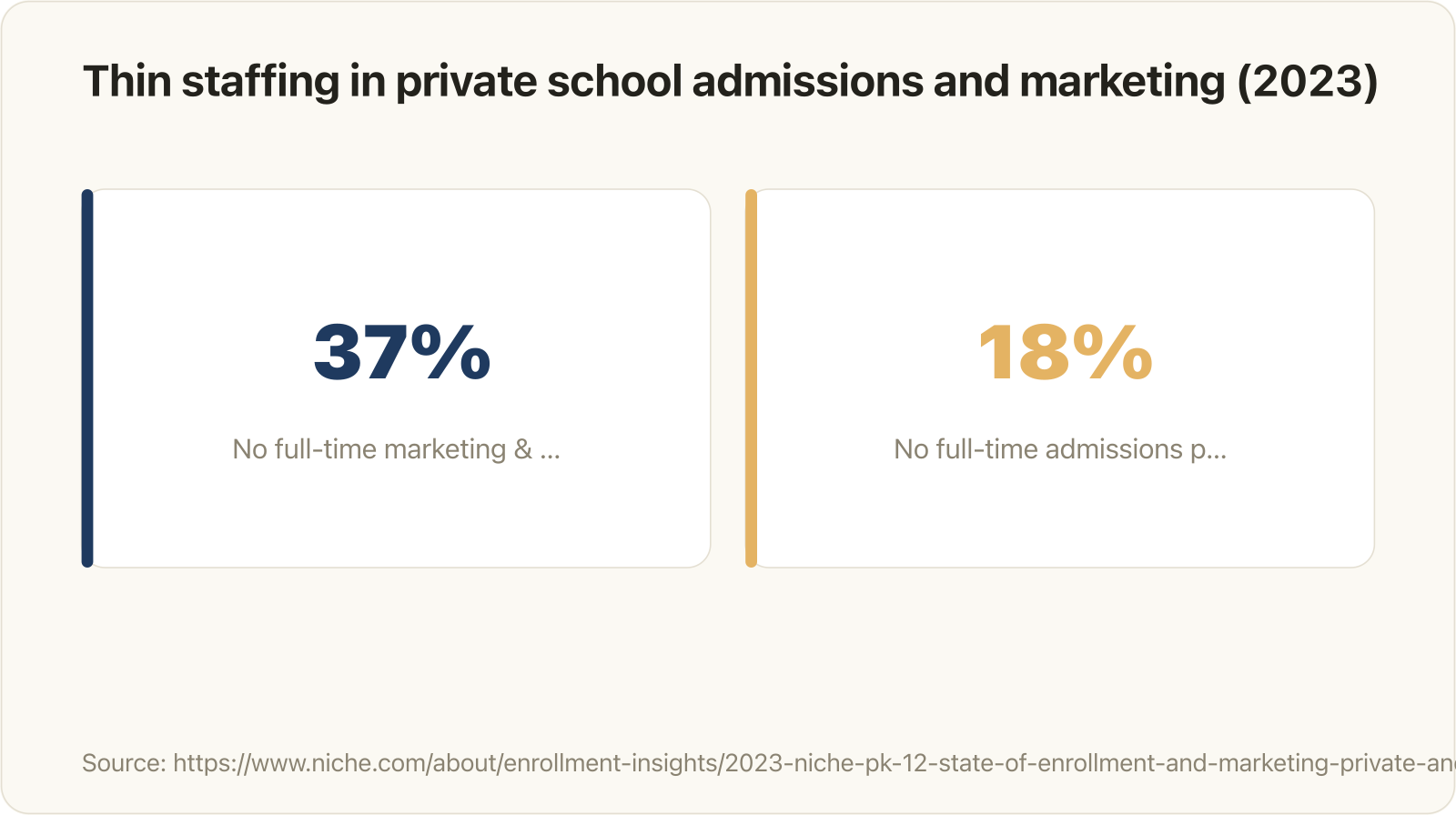
Staffing gaps behind personalized video for schools: 37% of private and independent schools had no full-time marketing staff and 18% had no full-time admissions professional
Share of private and independent PK-12 schools reporting no full-time staff in each role, according to the 2023 Niche PK-12 State of Enrollment and Marketing report. (Image Source: Niche)
Three different things share the word “personalized” in school marketing. A personalized video goes from one sender to many individual recipients, and each copy carries that family’s details. A group video works the other way around: many contributors record clips for one recipient, such as a retiring teacher. A branded school video carries only the school’s name and looks the same for everyone.
Personalized video for schools works through a template with merge fields. Render tools such as JSON2Video describe template placeholders filled through an API for text, images, video, and data, which lets a system create hundreds or thousands of videos automatically. Your admissions director records the master video once, and the software swaps in each family’s name, grade, and program. Nobody re-records anything.
Staffing makes this kind of automation relevant, though the newest survey data we found is from 2023. In the 2023 Niche PK-12 State of Enrollment and Marketing report, 37% of private and independent schools reported having no full-time marketing and communications employees, and 18% had no full-time admissions professional. We found no school-specific benchmark that shows how much video lifts replies or tour bookings. Treat any lift from video as a hypothesis to test against your own plain-text baseline.
Where personalized video fits in the school year
Personalized video fits best at recurring, high-volume touchpoints where the message stays the same and only the family details change. Those touchpoints are inquiry follow-ups, campus tour reminders, application deadline nudges, enrollment welcomes, and re-enrollment reminders. Personalized video works where the message repeats and only the family details change.
Each of these touchpoints already runs on data your school holds in its admissions CRM or student information system (SIS). The matrix below maps each touchpoint to the merge fields it needs:
| Touchpoint | Merge fields | On camera | Goal |
|---|---|---|---|
| Inquiry follow-up | Parent first name, student first name, grade of interest, admissions contact | Admissions director | Book a tour or call |
| Campus tour reminder | Parent name, tour date and time, parking or meeting point | Tour guide or admissions staff | Reduce no-shows |
| Application deadline nudge | Parent name, program, deadline | Admissions director | Finish the application |
| Enrollment welcome | Student name, grade, advisor or homeroom teacher | Head of school or teacher | Build belonging before day one |
| Re-enrollment reminder | Family name, returning grade, contract due date | Head of school | Return the contract on time |
The same template logic works for acceptance videos, annual fund appeals, and donor thank-yous, where the head of school or development director records once and each family or donor sees their own name and gift context.
Anchor each video to your own admissions and re-enrollment calendar rather than a generic schedule. Pull deadline and contract fields from the same source your business office uses. That way, a video never quotes a different date than the contract does.
When is a hand-recorded video the better choice?
A hand-recorded video is the better choice when the news is sensitive or the audience is tiny. Waitlist and denial messages, financial aid conversations, and anything going to fewer than about 10 families deserve a real, individually recorded video from someone the family knows. A template with a name overlay is the wrong tool for these moments.
Use the “Template or Personal” rule to decide:
- Template: the message is routine, identical for every family, and goes to more than about 10 recipients.
- Personal: the news is sensitive, such as a waitlist decision, a denial, or a financial aid question.
- Personal: the relationship is individual, for example a returning family with a specific concern.
- Personal: the list has fewer than about 10 recipients. In that case, a phone recording by the head of admissions takes minutes and needs no setup.
Never automate bad news. A templated apology with a name dropped in reads as cold, and parents notice.
What do 10, 100, and 1,000 videos cost?
The cost of a personalized video depends mostly on volume and route. Wideo’s Pro plan lands around $0.56 per 60-second video at 1,000 videos a month. Per-minute hosted APIs cost less: Shotstack lists pay-as-you-go pricing from $0.20 per rendered minute. A self-run render pipeline only pays off if its build and upkeep cost less than the API fees it replaces. At 10 videos, recording by hand is usually the most practical option because it needs no setup.
The following example calculation assumes videos of up to 60 seconds and one master recording done in-house by existing staff. It leaves staff time out of the cash cost. It also assumes you send only the stated number of videos in that month, using one list-price plan per volume.
For the hosted route, Wideo’s published API pricing counts 1 credit as 60 seconds of generated video. The Basic plan costs $299 a month for 500 credits, and the Pro plan costs $560 a month for 1,000 credits. A 2-minute video uses 2 credits, so a longer script doubles the cost per family.
For the self-run route, we draw on our own experience. At alloq.digital, we built an automated pipeline on n8n, a workflow automation tool, and FFmpeg, an open-source video processing tool. That pipeline has produced more than 200,000 personalized videos at roughly 1 to 3 euro cents per video, running unattended. The catch is the build effort: someone has to design the template, connect the data, and maintain the setup before the first video renders.
The table below compares both routes at each volume, using Wideo’s list prices for the hosted column. Per-minute hosted APIs such as Shotstack (from $0.20 per rendered minute) or JSON2Video’s Professional plan ($49.95 a month for up to 200 rendered minutes) cost less per video at every volume.
| Volume | Wideo API per video | Self-run render per video | Recommended approach |
|---|---|---|---|
| 10 | About $29.90 (Basic) | Server costs plus build effort | Record by hand |
| 100 | About $2.99 (Basic) | Server costs plus build effort | Per-minute API or no-code tool |
| 1,000 | About $0.56 (Pro) | About 1 to 3 euro cents in our pipeline, after a one-time build | Per-minute API; self-run only if build and upkeep beat API fees |
On Wideo’s plans, per-video cost falls sharply with volume, from about $30 at 10 videos on Basic to about $0.56 at 1,000 on Pro. At 100 videos on the Basic plan, you pay for 400 credits you never use.
A fourth route is an agency or enterprise provider such as Idomoo or Allied Pixel, which handle templates, data, and delivery for you. Request a quote and compare it with the per-video figures above before you commit.
Which level of personalization do you need?
For most private school touchpoints, the level of personalization you need is simple: a name and grade shown as text on screen, plus a personalized thumbnail. Synthetic voices and AI avatars add pronunciation and consent risks. A small admissions or communications team has to manage those risks on every send.
The four levels below run from cheapest to most effort:
- Level 1, text overlay: the family’s name and grade appear on screen over the master recording. Render cost stays lowest, and review is quick.
- Level 2, personalized thumbnail or landing page: the email preview image and the page hosting the video carry the same merge fields.
- Level 3, synthetic voice: text-to-speech speaks the name. Every name needs a pronunciation check.
- Level 4, AI avatar or voice clone: a digital version of the head of school speaks each message. This level needs written consent from the person being cloned and carries trust risk with parents.
Every level beyond on-screen text adds review effort, not just render cost. Levels 1 and 2 cover inquiry follow-ups, tour reminders, and re-enrollment reminders well. Move to level 3 only when someone has time to listen to every rendered name before it goes out. Levels 3 and 4 also raise cash cost, because voice and avatar features may require higher plans or add-ons, so check vendor pricing first.
A simple setup a small team can run
A small team needs one script, one master recording, a clean data export, a template, batch rendering, and the email tool it already uses. Once the first touchpoint works, each additional campaign reuses the same setup with a new script and a different set of merge fields.
The seven steps below follow that order:
- Pick one touchpoint, such as the inquiry follow-up, and write a 30- to 60-second script with clearly marked merge fields like {parent_first_name} and {grade}.
- Record the master video once, and leave clear space on screen for the text overlay.
- Export only the fields you need from your admissions CRM or SIS as a CSV file: parent first name, student first name, grade, and contact person. Use only data the family has given the school.
- Build the template. Tools such as JSON2Video connect to n8n, Make.com, or Zapier, which reduces the need for a developer, but expect a learning curve or budget for a freelancer.
- Render in batches. With Wideo’s API, you submit a batch, receive a batchId, and collect the finished videos via webhook or polling.
- Send through your existing email tool, with a preview image linked to the hosted video, because most inboxes do not play embedded video.
- Measure watch rate, replies, and tour bookings against a plain-text control group.
Measure each touchpoint against a plain-text control group before you scale it. For re-enrollment, the metric that counts is on-time contract returns, not views. Split the list in half, video versus plain text. Small lists only reveal large effects, so pool results across touchpoints or cycles.
Mistakes to avoid with personalized school videos
Most personalized video mistakes start in the data, not in the software. The list below covers the ones that cost a school the most trust:
- Dirty data. Misspelled names, legal names instead of preferred names or nicknames, and empty fields all show up on screen. Set a fallback such as “Hi there” for every merge field.
- Mispronounced names. Synthetic voices guess at unfamiliar names, so someone has to listen to each one before it goes out.
- Videos that run too long. Keep the template at 60 seconds or less. Under Wideo’s pricing, that keeps each video at 1 credit.
- Sending 1,000 emails at once from a cold domain. Stagger sends over several days to protect deliverability.
- Careless handling of student data. Check how FERPA, COPPA, your state’s student privacy laws, and the GDPR for EU families apply, and sign a data processing agreement with your video vendor. Use only data the family has given the school, limit fields to what the video needs, check how your vendor stores data and how long video links stay valid, and involve whoever handles student privacy at your school.
- Automating sensitive messages. Waitlist, denial, and financial aid messages belong in the hand-recorded category described above.
Never send a batch before a person has checked at least 20 rendered videos. A spot check tests the template; validate names in the CSV beforehand with the admissions team.
Conclusion
Personalized video for schools pays off where the same message goes to many families every cycle. Start with one recurring touchpoint, keep personalization to name and grade, compare costs at your real volume, and test against plain text. In render list prices alone, excluding hosting, staff, and QA time, that means about $30 per video at 10 videos on Wideo’s Basic plan and about $0.56 at 1,000 on its Pro plan.
Your first step: pick one touchpoint for the next cycle and split the send. The inquiry follow-up works well. Write a 45-second script with three merge fields, then send the video to half of your new inquiries while the other half gets your current email.
Frequently asked questions
Can you embed a personalized video directly in an email?
A personalized video will not play inside most email clients, so embedding it directly rarely works. Send a preview image instead, linked to the hosted video, and keep the subject line plain. A thumbnail that shows the family’s name works well as that image and reinforces the personal touch before anyone clicks. An animated GIF thumbnail adds motion, but keep the file small. Host videos on a platform that streams to phones without heavy bandwidth, and use SMS only for short reminders that families opted into.
How do we know if personalized video works better than our current emails?
Split your next send to find out whether personalized video beats your current emails. Half of the families get the plain-text email and half get the video, with everything else unchanged. Compare replies, tour bookings, or on-time re-enrollment forms, and run at least one full cycle before you decide.
Is it okay to use an AI clone of our head of school’s voice?
An AI clone of your head of school’s voice is acceptable only with that person’s explicit written consent. Tell families when a voice is synthetic, and test the pronunciation of every name before sending. For most schools, the real master recording plus on-screen text avoids the issue and keeps parent trust intact.
About the author
Simon is the founder of alloq.digital, a software studio in Austria that builds SaaS platforms, internal tools, and automation systems.