The web’s changed a lot since the days of fixed-width layouts and “best viewed on Internet Explorer” banners. Now, people are jumping between phones, tablets, desktops, and foldables like it’s nothing. And they expect every site to just work!
That’s where responsive web design (RWD) comes in: Layouts that adapt, content that flexes, experiences that don’t fall apart the moment someone rotates their screen. But how do you make your website work next year and beyond?
Don't worry; This page serves as your responsive web design update in 2026 for every small business. Read on to learn how to build a website that works everywhere.
A Responsive Web Design Overview: Its Past, Present, Future
In today’s digital landscape, it’s imperative to keep up with modern web design trends. And RWD remains relevant and proves useful to this day!
Responsive web design is all about making websites that adapt, no matter what screen, device, and/or orientation someone’s using. It’s the reason a page can look great on a six-inch phone, a widescreen monitor, or anything in between. In short, it’s web design that bends, not breaks!
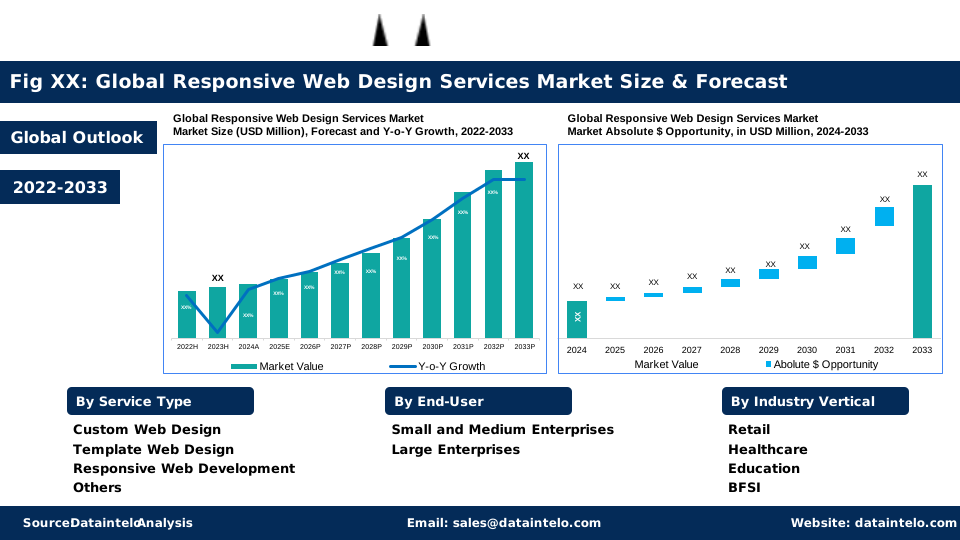
And the RWDS market shows no signs of stopping or even slowing down anytime soon:
In fact, its worldwide market could grow from $7.2 billion in 2023 to reach $22.7 billion by 2032 at a 13.5% compound annual growth rate (CAGR). That surge comes from more people getting online, more devices in play, and more businesses realizing the value of a seamless, flexible design.
Now, let’s rewind and see how we got here. Likewise, discover how responsive design went from a clever idea in 2010 to the powerful, flexible standard it is today.
How We Got Here (The Speed-Run Version)
Ethan Marcotte coined "responsive web design" back in 2010-2011, and honestly, the guy nailed it. His three basics (fluid grids, flexible images, and media queries) still work. But man, things got complicated fast.
Remember when the iPhone 4 came out with that Retina display? Suddenly, everyone's images looked like garbage. Then, we got flexbox (thank god, no more floats). CSS Grid changed the game again, and now we're dealing with Core Web Vitals optimization because Google decided page speed should affect rankings.
Oh, and accessibility in web design finally became non-negotiable. WCAG 2.2 dropped in 2023, and Europe's basically saying, "make your sites accessible by 2025 or else." About time, honestly!
The tools we have now would blow 2010-me's mind. Container queries? You can make components responsive to their container, not just the viewport. The :has() selector? You can finally style parents based on their children. CSS is getting weird, and everyone loves it!
What Responsive Design Actually Means “Now”
Let me be honest: Responsive web design used to be simple. You'd make your site shrink on phones, call it a day, and pat yourself on the back. But that was 2010. Now? It's a whole different game!
These days, responsive design means your site needs to work on everything from a cheap Android phone to a $3,000 MacBook to whatever weird foldable Samsung just released.
And it's not just about screen size anymore. People expect sites to load fast on crappy airport WiFi, work with screen readers, and not make their phone batteries cry.
Here's the kicker: Mobile traffic passed desktop years ago. StatCounter says we're pushing 60% mobile usage globally in 2024, and it keeps climbing. So if your site sucks on mobile, you're basically telling most of your visitors to get lost.
What's Coming Next
Most industry key players think the future is all about artificial intelligence (AI) with personalization in mind. Maybe. But we’re more excited about the practical stuff!
Here's what to expect:
- Container queries are just the beginning. We're going to see more component-level thinking, where pieces of UI are truly self-contained and portable.
- Design tokens are finally getting standardized. This means sharing design decisions between platforms will get easier.
- The prefers-reduced-data media query is coming. This lets us serve lighter experiences to people on limited data plans.
- More browsers are adding ambient light sensors, not to mention time-based adaptations.
- Privacy concerns are real, but the potential is interesting.
How To Build a Responsive Website That Works Everywhere in 2026
It’s crucial to keep up with the website design in 2026. But what does building a “truly responsive” website look like today? As cited, it’s not just about making layouts squish and stretch anymore. It’s about crafting experiences that feel effortless on any device and for any user.
The web in 2026 demands more: faster sites, smarter tools, cleaner codes, and guaranteed accessibility baked in from day one. That said, here’s how to build websites that actually hold up:
1. Go beyond the basics
Shrinking a site to fit a screen isn’t enough anymore. In 2026, great design means layouts that flex, images that stay sharp, and pages that just work anywhere.
Take it from Leigh McKenzie, Community Advocate at Traffic Think Tank. Having worked with countless websites to improve search engine optimization (SEO) performance, he believes design and functionality now go hand in hand.
McKenzie says, “Good web design isn’t just about looking great. It’s about adapting seamlessly to every device and user need. If your site can’t flex, it can’t compete.”
McKenzie gives a few recommendations:
- Fluid grid design: Forget pixels. Think in percentages and those fancy CSS functions like clamp(). Here's the approach: You let content flow naturally, then add constraints where things get ugly. Have a glimpse of a perfect example from Webflow below:

- High-quality images: Two words: srcset and sizes. Let the browser pick the right image. And please, for the love of bandwidth, use modern formats. AVIF and WebP aren't just trendy; They're legitimately smaller. Your users on data plans will thank you later!
- Smarter media queries: Yeah, we still use these. But instead of just checking screen width, check user preferences too. Some people hate animations (prefers-reduced-motion), some need high contrast, some are in dark mode. Respect that!
- Simple-to-fancy design: Start simple, add fancy...this is where people mess up. They build the fancy version first, then try to strip it down for mobile. Do it backwards. Build the simple version that works everywhere, then add the bells and whistles for bigger screens and better connections.
2. Use tools that actually work
Responsive design tools can save you hours and your sanity. Today’s toolkit makes building responsive sites easier, faster, cleaner, and a lot more fun.
Learn from Andy Wang, Marketing Manager at Skywork.ai. He recommends making the most of modern tools and frameworks to streamline workflows and boost site performance.
Wang explains, “Smart developers don’t reinvent the wheel. They use the right tools to build faster, test smarter, and deliver consistent, high-performing sites across every device.”
Wang suggests investing in the tools and technologies below:
- CSS frameworks: Look, you used to hate on Tailwind. "Inline styles with extra steps," you'd say. But after using it on a few projects, you get it. It's fast, it's consistent, and you can actually understand what's happening just by reading the HTML. Using CSS grid and Flexbox is key!
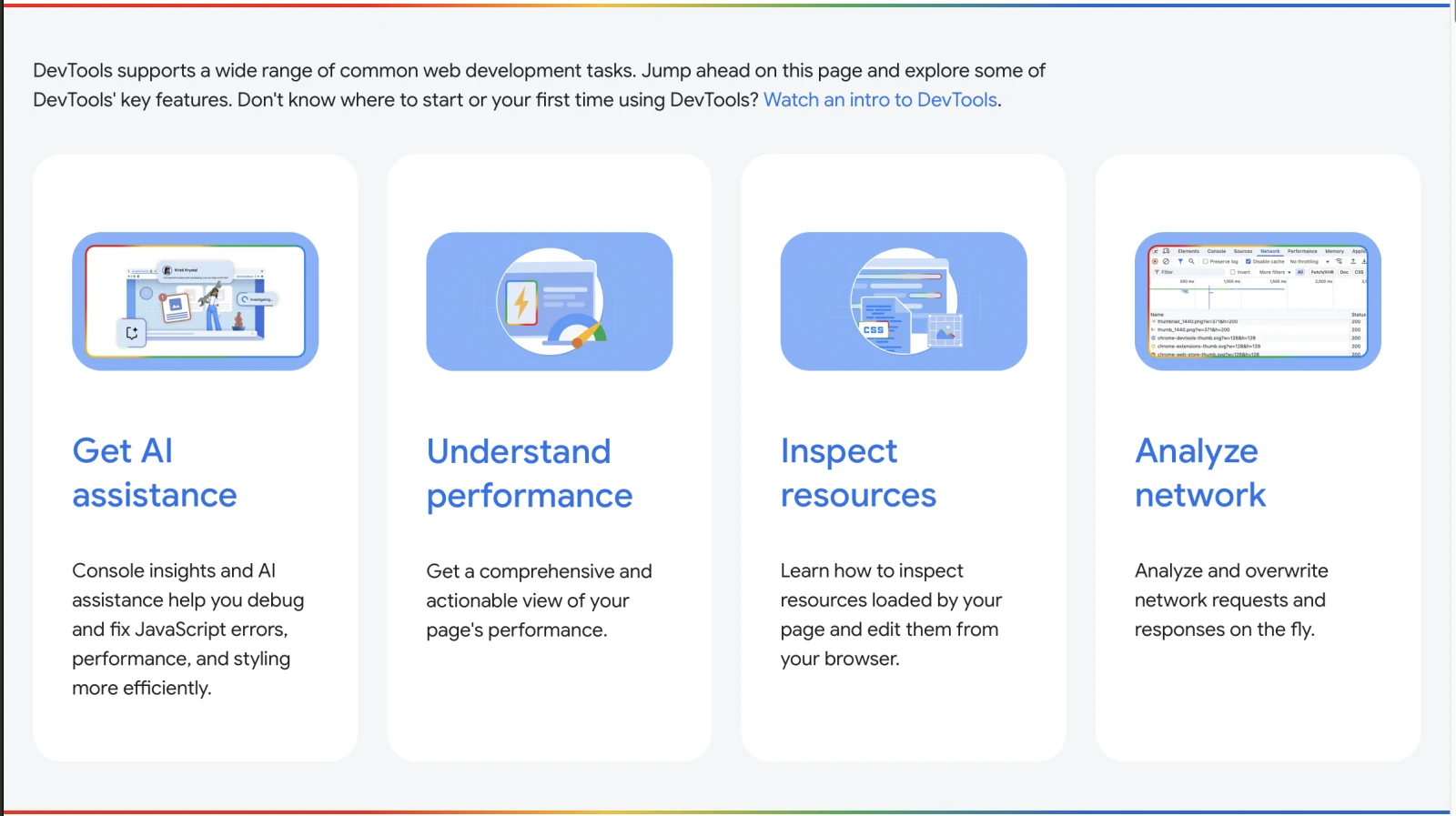
- Testing tools: Chrome DevTools is your best friend (see below). Firefox has great responsive tools too. But here's what most people skip: testing with actual throttling. Set your network to "Slow 3G" and your CPU to 4x slowdown. If your site still works, you're golden.
For performance, Lighthouse is the obvious choice, but WebPageTest shows you the real story. And please, please test with screen readers. NVDA is free, VoiceOver comes with Mac, and you'll learn more in an hour of testing than a week of reading docs.
- The new hotness: Container queries are a game-changer. You can finally make a card component that looks good whether it's in a sidebar or spanning the full width. No more breakpoint soup!
The View Transitions API is cool, but use it sparingly. Just because you can make everything slide and fade doesn't mean you should. Some of us get motion sick, you know?
3. Design for content
Breakpoints are dead, long live breakpoints.
Here's a secret: Stop designing for devices; Design for your content. When does your navigation get too cramped? When do your cards look stupid side-by-side? That's where your breakpoints go.
Yes, design for your content, not the device. When your layout adjusts naturally to what’s on the page, users stay longer, and Google notices. Use a keyword difficulty checker to find the right terms. BUT remember: Great SEO starts with a design that makes your content easy to read and love.
The RWDS rule of thumb:
- Tiny (phones)
- Small (big phones, small tablets)
- Medium (tablets, small laptops)
- Large (normal screens)
- Huge (those people with ultrawide monitors)
But honestly? With container queries, you can use fewer viewport breakpoints than ever.
4. Consider speed now more than ever
Website speed optimization remains a big factor in web designing. Anna Zhang, Head of Marketing at U7BUY, emphasizes the importance of speed in web design.
She draws the parallels to the fast-paced world of online mobile games. “In gaming, a split-second delay can make or break the experience, and it’s the same for websites. Speed isn’t just a technical metric; It’s what keeps users engaged and conversions climbing.”
That said, here's what actually moves the needle:
- Ship less JavaScript. Seriously. You probably don't need that 200KB animation library.
- Load images lazily. No one needs to download images they'll never scroll to.
- Inline your critical CSS. Yes, it goes against everything we learned about the separation of concerns. Do it anyway!
- Use resource hints. Preconnect to your CDN, prefetch your fonts, preload your hero image.
- Keep an eye on Core Web Vitals. LCP under 2.5s, INP under 200ms, CLS under 0.1. These aren't just Google being bossy. They represent real user pain points. Here’s what to keep in mind:
Here are the performance ranges for each status:
|
|
Good |
Need improvement |
Poor |
|---|---|---|---|
|
LCP |
<=2.5s |
<=4s |
>4s |
|
INP |
<=200ms |
<=500ms |
>500ms |
|
CLS |
<=0.1 |
<=0.25 |
>0.25 |
5. Build sites everyone can use
Stanislav Khilobochenko, Vice President of Customer Services at Clario, recommends designing websites for everyone who uses them.
He stresses the importance of accessibility and inclusivity in every step of the process. “A truly great website doesn’t just look good…it works for everyone. Heed my advice: When you design with accessibility in mind, you’re not limiting creativity; you’re expanding your reach.”
Khilobochenko suggests taking the following crucial steps for web design:
- Start with keyboard navigation. Can you tab through everything? Can you tell where you are? Then add mouse and touch. It's way easier than retrofitting keyboard support later.
- Color contrast matters more than you think. That light gray text might look elegant on your calibrated monitor, but it's invisible on a cheap screen in sunlight. WCAG says 4.5:1 for normal text, 3:1 for large text. Just do it.
- Touch targets need to be at least 24x24 pixels. Apple says 44x44. I aim for somewhere in between because fingers are fat and screens are small.
Take Cube Creative, for instance, proving how they’re thinking outside the box for their website. They also build a site with accessibility and inclusivity in mind. They seek to serve various small businesses needing web development and digital marketing services.

Final Thoughts
Responsive design in 2026 isn't rocket science, but it's not trivial either. Start with the basics: semantic HTML, flexible layouts, and progressive enhancement. Likewise, test on real devices with real constraints. Lastly, listen to your users, especially the ones having problems.
The tools and standards keep evolving, but the core principle hasn't changed: Build sites that work for everyone, everywhere. That's it. Everything else is implementation details.
Now go build something cool. And make sure it works on my ancient iPad. If you want expert help creating a high-performing website with responsive web design, speak with a Cube Creative designer!