
Marketing dashboards are one of the key aspects of your business. One of the most effective dashboards that you can use is Google Posts. This feature by Google allows it to provide high-ranking websites and check the results. A major reason why Google Posts is effective is because it offers an average clickthrough rate of 1.44% which is considerably higher than other marketing promotion channels. Since its launch, Google Posts have evolved and undergone many changes. This has become one of the most effective ways to communicate with the audience. Not only does this benefit your existing customers, but it also helps to attract potential customers.
What Are Google Posts?
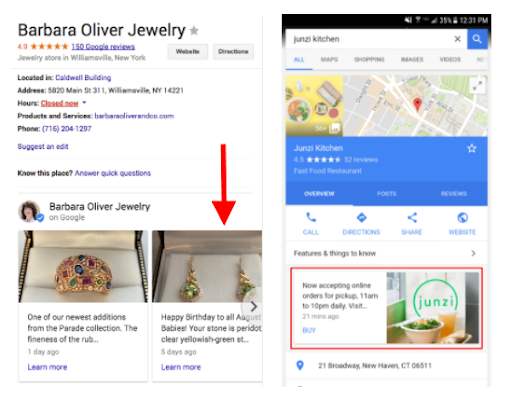
Google Posts are often referred to as Posts on Google. They provide an effective way for businesses to post texts and photos. The information is directly posted on Google Business Profile (earlier known as Google My Businesses). Therefore, all types of content that you create will appear not only on your Business Profile but also on Google Maps.
- Posting on Google provides one of the easiest and best opportunities to engage with customers. Some of the common examples of Google Posts are as follows:
- Share your daily specials and current promotions to attract the attention of new and existing customers.
- Use Google Posts to promote events or any upcoming shows that may be happening in your region.
- Show your products and new arrivals.
- Provide your customers with the option to purchase your products.
- Your customers should be able to sign up for the platform with the latest offers.
How to Create a Google Post?
Anyone with a brick-and-mortar or physical business should consider creating a Google Post. The best part is that you can seamlessly create the post for your business, irrespective of where you are. As long as you are connected to the internet, you should be able to create a Google Post in no time. Around 93% of the audience uses Google Maps to find a business, so if you’re listed and optimized, customers can find you easily. If you create a Google Post, you can do it via iOS or Android. It is very easy to create a Google Post. All you must do is follow the steps given below to make the Google Post:
- Step 1: Open Google Business Profile and login to your account using the credentials.
- Step 2: From the dashboard, select Posts.
- Step 3: Now, choose the "Write Your Post" option.
- Step 4: In the next stage, you must select the post type you are creating.
- Step 5: Write your content; if you want, you can add photos. Make sure to verify that the content to be uploaded is accurate.
- Step 6: Click on Publish to make the post go live.
Tips for Maximizing Google Post Impact
Optimizing Your Google Post correctly is one of the best ways to maximize the impact. Therefore, it is essential to look into the basics to ensure proper optimization. The key tips for maximizing the Google Posts impact are as follows:
1. Use High-quality Images:
One of the easiest ways to enhance the impact of Google My Business (GMB) is to use high-quality images. These visuals can play an essential role in making the content engaging and also contribute to driving engagement. However, while using high-quality images, it is important to use pictures that align with the brand values and core messaging. You should refrain from using poor quality or low-resolution images as they can have a negative impact on your business promotions.
2. Say No to Phone Numbers in Descriptions:
While phone numbers are essential, many people usually don't prefer the same when included in descriptions. If you include your business phone number in the description, there is a chance that the post will get rejected. It is advisable to automate the information through the Google My Business connector. However, if you include phone numbers, it becomes distracting. Whenever you are creating the Google Ads Post, make sure to stick to the goal. You must highlight important information so the target audience can connect to it.
3. Integrate Actionable Headlines:
The headline will be the first thing your audience sees for your Google Posts. Therefore, it is essential to make them attractive and relevant. Creating actionable headlines will encourage people to tap into it. If you try to create actionable headlines that arouse an emergency, it can be highly beneficial. While you create actionable headlines, it is essential to ensure that they adhere to the compliance guidelines, which can be helpful for branding. Google reviews all the information for compliance guidelines following. Furthermore, you should not integrate any information that encourages the use of offensive or sexually suggestive content. If you include explicit content, the post will not get any attention and will be inactive.
4. Have an Informative Yet Concise Description:
Google Business Profile Post has a limit of 1500 characters for every post. However, only the first 80 characters will appear in the Knowledge Panel of Google Search Results. Therefore, it is imperative that while creating the description, you are keeping it concise yet informative. After creating the first post, you can use Google Analytics to track your posts' performance. This will help you gain valuable insights for your posts and understand what resonates with your audience the most. Consider including bullet points to ensure the information is easy to grasp and understand. For businesses that deploy ai sdr tools solutions, tracking the performance of Google Posts alongside other outbound engagement metrics can create a more holistic view of lead generation success.
5. Include Clear CTAs:
It is essential to include clear CTAs. A CTA (call-to-action) is necessary for Google and users to understand the next step. While you are including CTAs, you must provide clear information. You can check some examples of workable CTAs to make the choice. If you are including CTAs, it is advisable to ensure that they align with your brand guidelines and objectives to increase business visibility on Google. Moreover, it must be connected to your landing page so that direct traffic lands on the website. However, do not include CTAs that can hamper the reputation of the post. Be mindful of potential digital transformation risks and challenges that could arise from poorly executed CTAs, as these can negatively impact user experience and brand perception.
Conclusion
Google Posts are one of the best ways to get direct traffic for your business. Integrating it correctly can play an essential role in improving the business profile online. They bring in various unique opportunities to drive the growth of your business through engagement. Moreover, it can also help to boost local SEO, which can be helpful in the long run. Make sure to measure the metrics as well to avoid any significant problems.